Booking and CRM for small service crews
The simple way to run a service crew.
Your booking page, schedule, crew app and invoices in one place. Nothing you don't need. One price for the whole team, and we set it up with you.
Example business with sample data
Why small crews pick it
Simple on day one. Still simple when you grow.
Only what you need
You start with five things: a booking page, an inbox for requests, a schedule, the crew app and invoices. Add more tools only when you want them, and your menus stay short.
One price for the whole team
No fee per person. Your plan covers everyone on your crew, from just you up to 30 people, so adding a helper never adds a per-person charge.
Set up with you
Built by someone who runs a home service business. We bring in your services, prices and customers with you on a call, so you are not figuring it out alone.
How it works
From the first request to the money in your account.
One job, start to finish. Every screen here is the real app, filled with a sample business.
They pick a service and a time from your booking page.
You get your own page with your logo, services and prices. Share the link on Instagram, Google or your website. Customers answer the questions you set, like how many bathrooms or if there is a dog.
- Request a time or book an open slot. You choose which.
- Take a deposit when they book.
- Eleven looks to pick from. No designer needed.
Every request lands in one inbox, with the answers attached.
No more digging through texts, DMs and voicemails. Open a request, read what they need, then put it on the schedule or send a quote. The customer gets an email either way.
- Schedule it and pick who goes.
- Send a quote with good, better and best choices.
- Make it repeat every week, two weeks or month.
Their whole day is on their phone. No paper, no group texts.
Each person sees only their jobs, in order, with directions and the gate code. They check off the list and take before and after photos, so you know it was done right.
- A checklist for every service, with a reason when something is skipped.
- Clock in and out on the same app.
- Offer an extra at the door. If they say yes, it goes on the bill.
The report and the bill go out when the job is done.
The customer gets one link with the photos, the checklist and what they owe, with any deposit taken off. They pay by card from that page, and the money goes to your bank through Stripe.
- Reminders go out for you when a bill is late.
- Ask for a review right after a good visit.
- See what you made this month, and what is still owed.
See it in one minute.
A request comes in, lands on the schedule, goes to your crew's phone, and ends with a visit report and a paid invoice. One minute.
Example business with sample data. No sound needed.
What your customers see
No app for them to download. No account to make.
Everything they need comes as a link in their email, with your name and logo on it.
Book from a link
Your booking page opens in any browser. They pick a service, answer your questions and choose a time.
Sign the quote on their phone
They pick the option they want, add extras and sign with a finger. No printing, no email back and forth.
Get a report and pay
After the visit they get the photos, what was done and the bill, all on one page.
Three maps, three jobs
See your work on a map.
Each map answers a different question, so nobody mixes them up.
Where is everyone going today?
Every job for the day as a pin, numbered in order and colored by person. Tap Best order and the stops line up in the shortest drive. Your crew opens the route in Google Maps.
- Where
- Schedule, then Map
- Comes with
- Included
Which day should a new customer go on?
Your regular customers on a map, colored by the day you visit them. When a new address comes in, you see which day already has stops nearby, so you add them where it saves driving.
- Where
- Recurring, then Route areas
- Comes with
- Optional, for route work
Which houses have we knocked?
For teams that knock doors or drop flyers. Reps mark each house on their phone. Give each rep an area for the day. Interested and quoted houses land in your requests. No dot means nobody has been there yet.
- Where
- Grow, then Door to door
- Comes with
- Optional
Route areas show customers you already have. Door to door shows houses that are not customers yet.
Start simple
Add tools only when you grow.
Every account starts with the essentials. Everything below is one switch away, included in every plan, and your menus only show what you turn on.
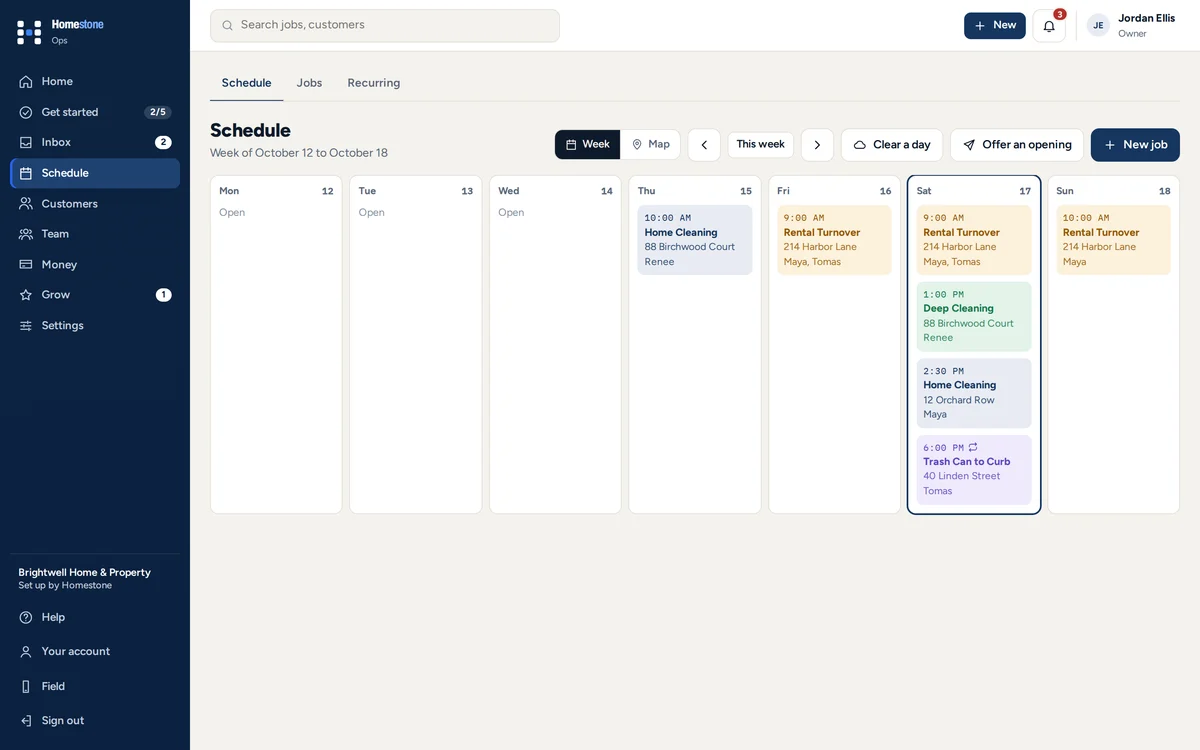
A schedule the whole team can see
Every job by day and by person. Rained out? Clear the day and move every job in a few taps.
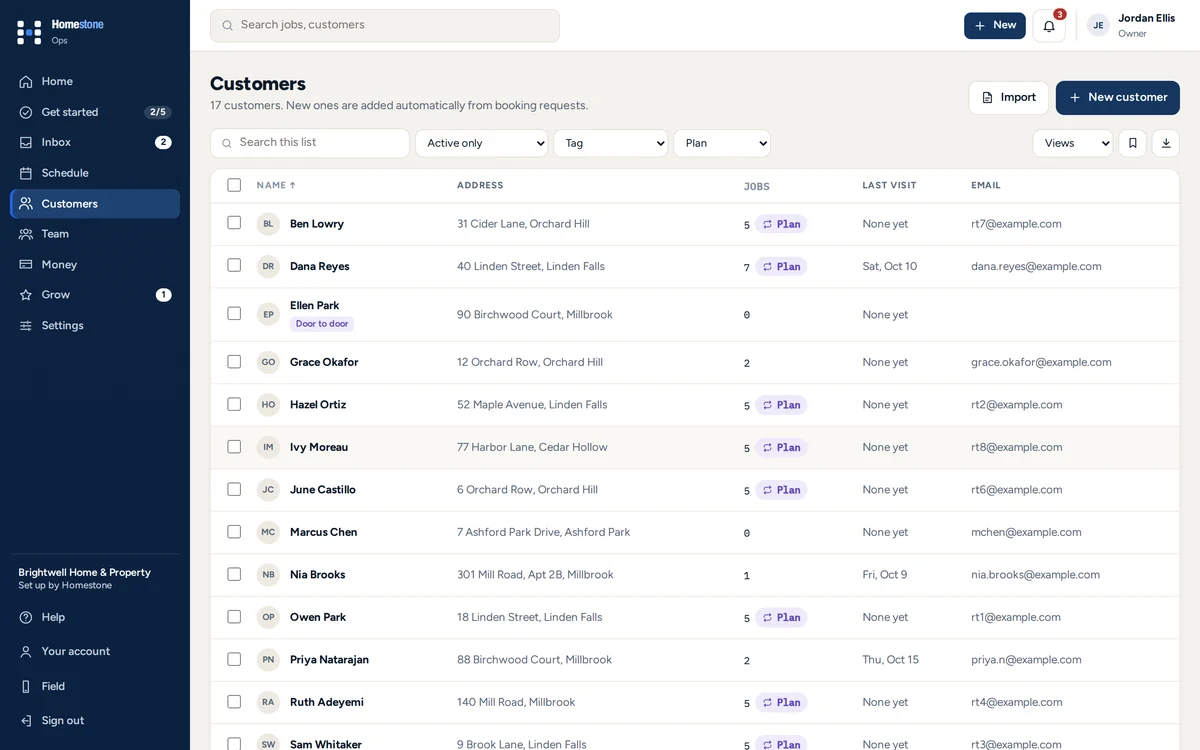
Every customer in one list
Their homes, visits, notes and what they paid. Added on their own when they book.
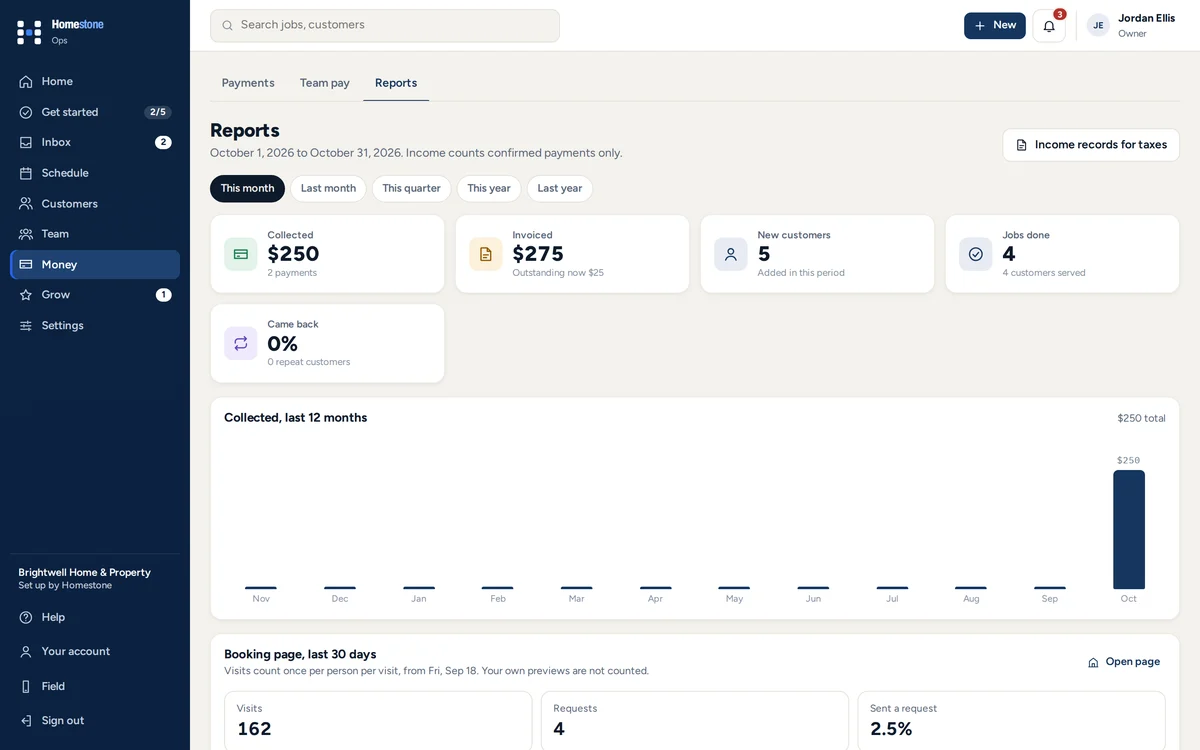
Know your numbers
What came in, what you spent and how many people looked at your booking page.
See every tool you can add 26 tools
Get booked7 tools
Booking page
Your logo, services and prices in one of eleven looks.
Instant booking
Customers pick a real open time from each person's hours.
Quotes with choices
Good, better, best and add-ons, signed on their phone.
Deposits
A set amount or a percent to hold the time, taken off the bill.
Seasonal offers
Dated offers like 15% off spring cleanups.
Gift cards
Sell them on your page or hand them out. They never expire.
Packages
Packs of visits paid up front.
Run the day7 tools
Schedule and Day map
Every job by day, person or on a map.
Field app
Directions, gate codes, checklists and photos.
Recurring plans
Weekly, every 2 weeks or monthly, with skip and pause.
Route areas
Regular customers on a map by service day.
Door to door
Mark houses, give reps areas, catch leads.
Multi-day jobs
One price and one bill for jobs that take days.
Time clock
Clock in and out, timesheets to approve.
Get paid6 tools
Invoices
Sent when the job is done, with reminders when late.
Card payments
Paid from the bill, through Stripe, to your bank.
Extras at the door
Your crew offers an add-on and it goes on the bill.
Expenses and receipts
Log costs and see real profit.
Mileage
Miles at your rate, for taxes or to pay staff back.
Team pay
What each person is owed, ready for payroll.
Grow6 tools
Reviews
Ask happy customers for a review right after a visit.
Email marketing
Review requests and win-back emails that send themselves.
Loyalty rewards
A reward every few visits or so much spent.
Customer referrals
A link to share and a reward when a friend books.
Customer page
One link with every visit, quote and bill.
Reports
What came in, what you spent and who booked.
Also on every plan: calendar sync, reminders the day before each visit, roles for owners, managers and crews, a Book now button for your website, QuickBooks Online, and your data to download anytime.
A booking page that looks like yours.
Eleven looks, with your name, colors, photos and services. Tap one to open a working example.
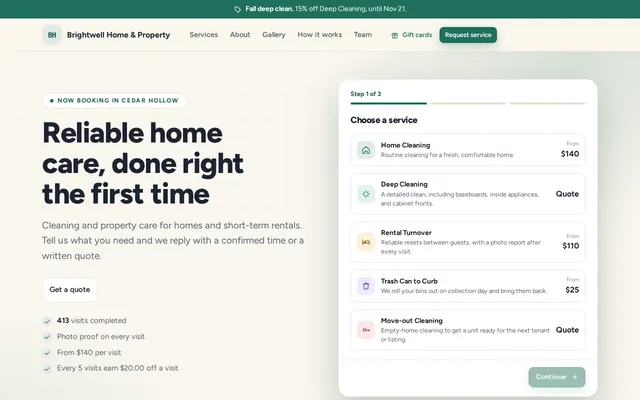 FreshBright and friendly.
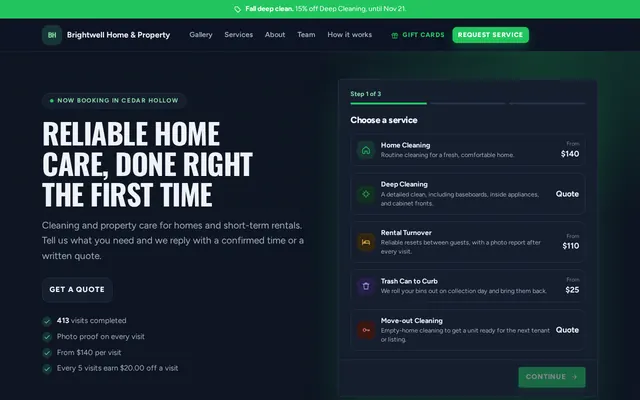 BoldDark, strong, uppercase.
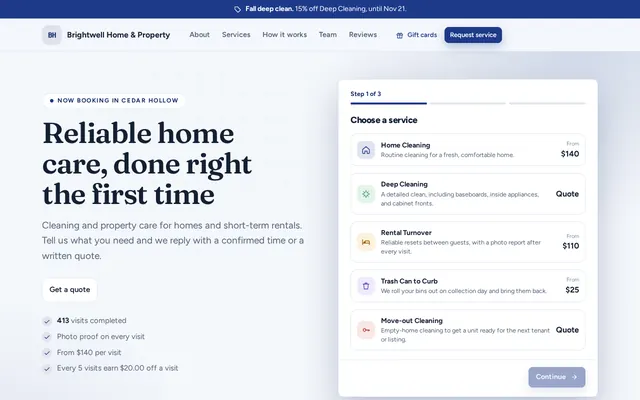 ProfessionalNavy and serif, built on trust.
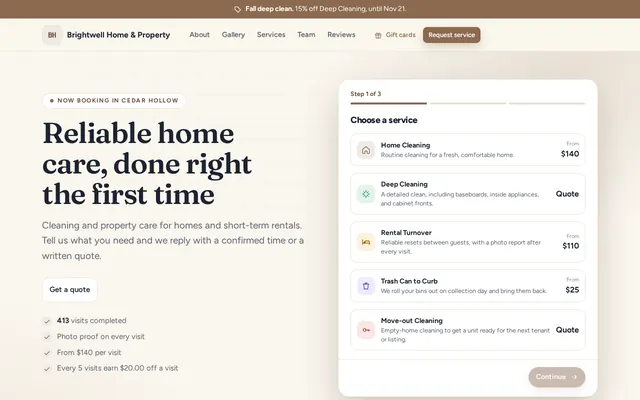 ElegantSoft and photo-led.
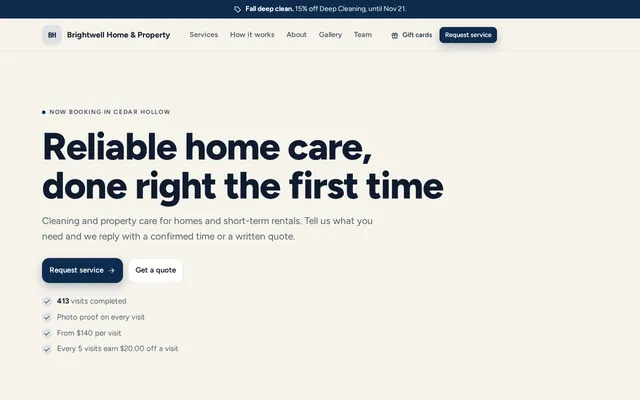 EditorialNavy and cream, calm.
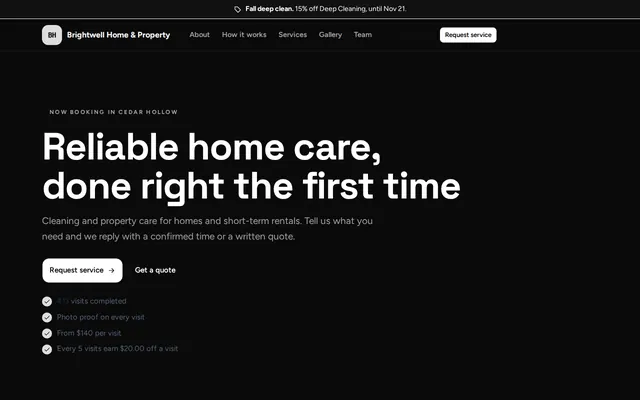 StudioBlack and white, minimal.
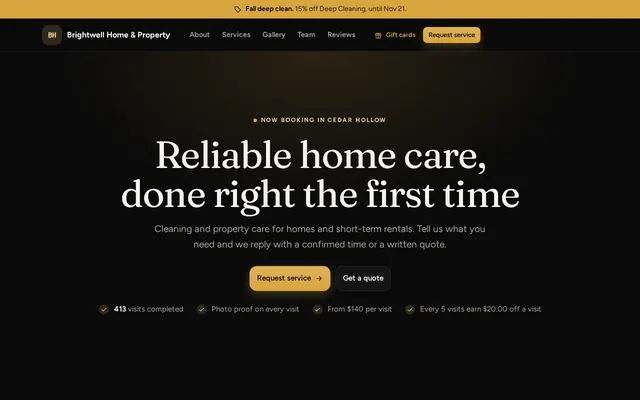 LuxeBlack and gold, for premium work.
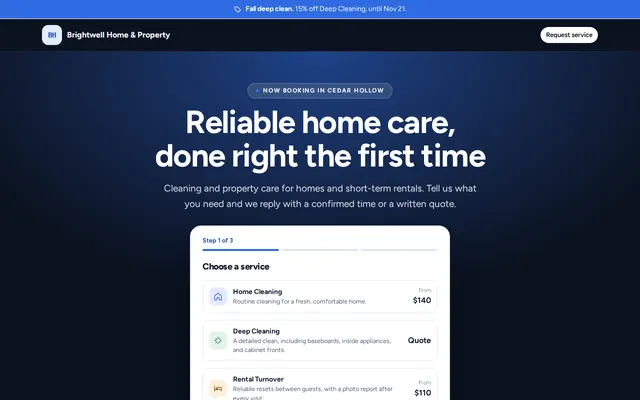 SpotlightMade for visitors from ads.
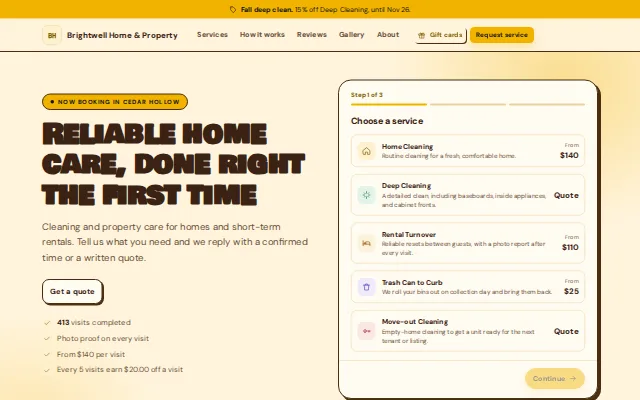 PlayfulChunky type, sunny and fun.
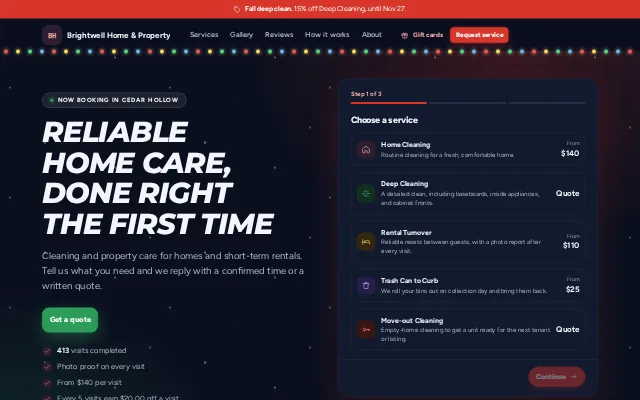 FestiveNight sky and falling snow.
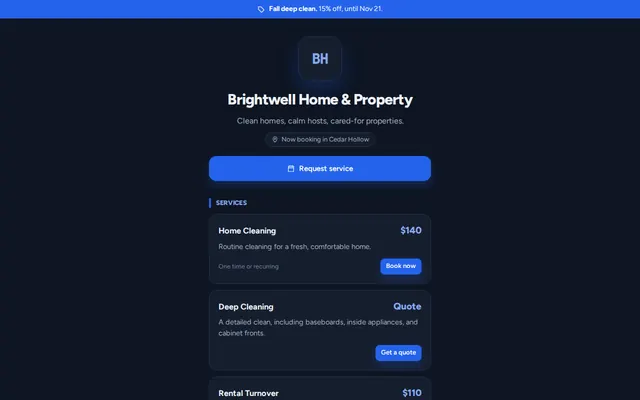 CardOne tidy column for phones.
One price for your whole team.
Every feature on every plan. Pay yearly and get two months free.
Swipe to see every plan
Loading plans
Every plan starts with 14 days free. No card needed until you decide to keep going.
Billing details
Prices in US dollars. Monthly plans renew each month and can be canceled anytime. Yearly plans renew each year and can be canceled for a full refund within the first 30 days. Setup fees are only for setup done with us, and are refunded if you cancel before your setup call. When a free trial ends, you have 3 days to start your plan before your workspace is paused; nothing is deleted. Details are in our refund and cancellation policy.
Your plan is billed securely through Stripe; Homestone never sees or stores your card number. Card payments from your customers go through your own Stripe account, and Stripe charges its standard processing fees.

I started Homestone because I run a home service business myself, and I was tired of juggling texts, spreadsheets and payment apps to keep it going. I wanted one place for bookings, my team, payments and what we spend, set up the way my business actually works. That is what we build for you, with you.
Simone, founder. Setup calls are with me or my team, not a call center.
Why we are called Homestone
Every strong home starts with one stone, laid first, that everything else is built on. Homestone is that stone for your business: one solid place for your bookings, your crew and your payments, so everything else can grow on top of it. Look at our mark and you will see it: a blue stone set in the middle of the H.
From the owners who use it.
Owners who leave a review get a free week of Homestone, whatever they say.
Questions people ask first.
Anything else, use Questions? Message us at the bottom of the page.
Is there a free trial?
Yes, 14 days on every plan. Start on your own and it begins the day you sign up, with no card and no setup fee. Set it up with us and it begins on your setup day. Add a card in Settings when you are ready. If you have not by 3 days after the trial ends, your workspace pauses until you do. Nothing is deleted, and you can download your data any time.
Can you train my team?
Yes. The help guides and a direct line to Homestone are free on every plan, and setup done with us includes walking you through everything. For your team, add a live 60 minute training session over video for $99, when you book your setup call or any time after.
Who sets it up?
You can, in a few minutes, or Homestone does it with you. On a setup call we go through your services, prices and how you get paid, then build your workspace from a setup made for your industry. You review it, change anything you like, and invite your team.
Can I bring my existing customers?
Yes. Upload the customer export from Jobber, Housecall Pro, Square, Google Contacts, QuickBooks or a spreadsheet, or paste a list. Homestone matches the columns, shows you a preview, and skips duplicates. Phone-only customers come along too. Your booking page can be filled in from your current website or Instagram, and on a setup call we move your services and prices and invite your team for you.
Is my data safe?
Yes. Each business only sees its own data, and each person has their own sign-in and only sees what fits their role. Card payments run through Stripe, so card numbers are never stored by us. Receipts and job photos are stored privately, and you can download all your data anytime.
How do my customers pay me?
By card through your own Stripe account, or however they pay you today. Venmo, Cash App and Zelle are not connected to Homestone: your customer pays you in their app as usual, then you confirm it here so it is on the invoice and in your records. Only money you confirm counts as income.
Is it an app, or do we sign in on a website?
Both work. Homestone runs in the browser on any phone, tablet or computer, so there is nothing to download from an app store. Add it to your home screen and it opens full screen with its own icon, like an app. The Field app keeps working through spotty signal and catches up when the phone is back online.
I am just starting out. Is this for me?
Yes. Solo is $39 a month with no contract, for you alone or you and one helper. Setup is $49 once, or free if you pay $390 for the year. You get your own booking page, quotes, invoices and payments from the first day, and you can move to a bigger plan when you hire.
More questions
We have more than 30 people. Is this for us?
Homestone is built for small crews, and our plans cover up to 30 people. If your team is bigger, email [email protected] and we will tell you honestly whether it is a good fit.
Can it plan the order of my crew's stops?
Yes. On the schedule map, pick a person and tap Best order. Homestone puts that day's stops in the order with the least driving and shows you the new times before you save. You can email customers whose time changes. It works from the addresses, not live traffic.
What if my crew can't finish a job?
They tap Couldn't finish and pick a reason. The visit goes back on your schedule marked Not finished, you get an alert, and everything they already checked off and photographed stays with it. They can also text the customer from their phone right then.
Can my team track door knocking and flyers?
Yes, with Door to door turned on. Your team marks each house in the Field app: not home, flyer left, not interested, come back, interested, quoted or no soliciting. Interested and quoted people become customers you can follow up with. You can give each person an area, and they see it outlined on their phone with a button to drive there. It is different from Routes: Routes plans the customers you already have, and Door to door is for houses that are not customers yet. Your customers show on its map, so your team can say you already work on their street.
Can it handle jobs that take more than one day?
Yes. Mark the service as one that can take more than one day, then pick the days when you schedule it. It stays one job with one price: your crew picks up the same checklist and photos each day, and the customer gets one confirmation, one report and one invoice. Deposits can be a percent of the price, and you can add a linked return visit, like a takedown.
Does it help us upsell?
Yes. Quotes can give the customer two or three choices, like good, better and best, plus optional extras they can tick on. At the visit, your crew can offer an extra from their phone: the customer says yes in person, or approves it on their visit page, and it goes on the bill. Reports show upsells by person.
Can a customer have more than one property?
Yes. Add each property with its own address and access notes, then pick the property when you schedule. Good for rental hosts, property managers and second homes.
Can my crew take notes on free estimates?
Yes. On a walkthrough or quote visit, whoever goes writes notes, measurements and materials with costs in the Field app. You see them in Ops on the visit and the request, and can start a quote with the materials already filled in. Customers never see the notes.
Do my team and I need a special web address to sign in?
No. Everyone signs in at the same place with their email and password, and Homestone takes each person to the right business and the right screens for their role.
What if my team outgrows my plan?
When your plan is full, Homestone asks you to upgrade before adding the next person. Upgrading takes one click in Settings, and you only pay the difference for the time left in your billing period.
Is there a contract? How do I cancel?
No contract. Monthly plans can be canceled anytime from Settings through the billing portal. Yearly plans can be canceled for a full refund within the first 30 days, and after that stay active to the end of the paid year. Download your data anytime, it is yours to keep.
Do you take a cut of my payments?
No. Card payments go through your own Stripe account and Stripe charges its standard fees. Venmo, Cash App and Zelle payments go straight to you.
Can my booking page match my brand?
Yes. Choose one of eleven looks, then add your logo, colors, a cover photo, a gallery, an about or founder story and your team. You can change it anytime.
How do I pay my team?
Your usual way. Homestone works out what each person earned for the pay period, whether you pay hourly, per job, a percent of each job, a day rate or a salary, plus tips, bonuses and receipts to pay back. You pay by Venmo, Zelle, cash, check or a payroll service, then mark it paid. Homestone does not take out taxes, so employees should be paid through a payroll service. Ask your accountant what applies to you.
Can it help fill slow days?
Yes. Homestone shows the lighter days coming up. You offer an opening to customers who asked for an earlier time or are due for a visit, and the first one to say yes gets it. Nobody is booked without saying yes, and you confirm every one.
Can I track expenses and mileage?
Yes. Log what the business spends, attach receipts, and log miles at your own per-mile rate. Staff can submit receipts from their phone for you to approve and pay back.
What happens to my data if I leave?
You can download everything anytime. If a workspace is closed, you keep 60 days to download an export before it is deleted.
Your data stays yours.
Download everything anytime. Each business only sees its own data.
Cards handled by Stripe.
Card numbers are never stored by us, and you are paid directly.
No long contract.
Monthly plans cancel anytime from Settings.
A real person.
Questions go to a person at Homestone.
Run your next job on Homestone.
Start free in minutes, or let us set it up with you.
Get started with Homestone.
Set it up yourself in a few minutes. Pick your industry and your workspace comes ready with services, prices, checklists and a booking page.
14 days free. No card and no setup fee. Help from a real person whenever you ask.
After 14 days, add a card in Settings to keep going on your plan.
Tell us about your business and when suits you, then pay the one-time setup fee to hold your spot. We build your workspace with you on the call.
14 days free from your setup day, and your plan only starts after that. The setup fee is refunded if you cancel before the call.
Prefer email? Write to [email protected], or send a message on Instagram.
Nothing is charged today. You can change your plan any time during the trial.
Start my free trialThanks, we got it.
Homestone will reach out the way you picked to set a time for your setup call. A confirmation is on its way to your inbox.
Thank you. Your gift is on its way.
We emailed your receipt with the gift code. If you added their email, they have it too.